Pay On Delivery Countrywide!


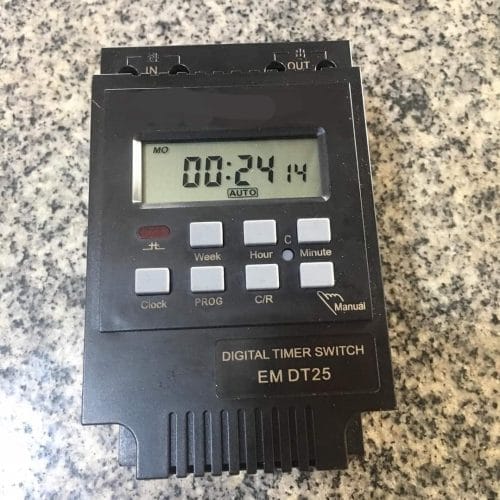
Digital Timer Switch – Digital Mains Timer Relay Socket with LCD Display 7 Days Electronic Programable Relay Time Switch 16on&8off Timer
KSh 2,000.00
🔥 4 sold in the last 8 hours
😊 11 people are viewing this right now
🚚 Estimated Delivery: Sep 9 – Sep 10
About this item
- Digital Timer Switch With LCD Display – Advanced pre-setting one week before.
- Digital Timer – Digital electronics general purpose time switch with daily and weekly programs.
- Programmable Timer Switch – DIN rail installation, DIN rail is not included.
- Digital Time Switch – To-the-minute setting accuracy, repeat programs with 16 ON and 8 OFF settings.
- Weekly Programmable Timer – LCD displays real-time to Hour/Minute and ON/AUTO/OFF.
Description:
This timer switch could automatically turn on/off all kinds of electric equipment according to the time the user set. It has a built-in 1.2V/40mA rechargeable battery and an industrial-grade chip. With high precision and strong anti-interference ability, the timer switch is great for controlling street lamps, neon lamps, production equipment, radio and television, and many other home appliances.
- Features:
- Digital Timer Switch With LCD Display – Advanced pre-setting one week before.
- Digital Timer – Digital electronics general purpose time switch with daily and weekly programs.
- Programmable Timer Switch – DIN rail installation, DIN rail is not included.
- Digital Time Switch – To-the-minute setting accuracy, repeat programs with 16 ON and 8 OFF settings.
- Weekly Programmable Timer – LCD displays real-time to Hour/Minute and ON/AUTO/OFF.
Specifications:
- Input Voltage: AC/DC12V, AC/DC24V, AC110V(Optional)
- Contact Voltage Rating: AC 180V to 264V(50/60Hz)
- Load Capacity: 16A 250VAC(resistive load)
- On/Off Operation: 16 on and 8 off(manual/auto)
- Display: LCD
- Power: 4.5VA(max)
- Error: ≤2s/day(25℃)
- Mounting Method: DIN rail(not included)
- Bound: 1 min to 168 hours
- Operating Temperature: -10℃ to 55℃
- Size: 86 x 36 x 65mm / 3.38 x 1.41 x 2.56″
- Quantity: 1
Instruction:
- When you use the timer switch for the first time, input AC and charge the inbuilt battery please, then press the reset button.
- The timer switch is at 24-hour mode as default. Press and hold the “time” button(bottom left, next to “reset”) for 5 seconds till it displays “AM” to set to 12-hour mode. Press and hold again the “time” button for 5 seconds to set it back to 24-hour mode.
Package Includes:
- 1 x Timer Switch
- 1 x English Manual
Installation Guide.
Related products

Mi 10W LED Smart Wifi Bulb(White and Color/Hue)..E27
KSh 2,600.00Timer Switch Timer Controller LCD Display Programmable Timer Switch. 230V/25A
KSh 1,600.0024 Hour Mechanical Plug-in Timer 13A Resistive 2A Inductive
KSh 1,400.0030A Sinometer AC Digital Timer 7 Days Programmable Weekly 24hours Street Lights Timer Relay Switch For Lighting Lights Irrigation Automation – 200v-250V
KSh 1,900.00



Reviews
There are no reviews yet.